
Charles D
Drumcode, Truesoul, Arcane
★★★★★
“Loving this new reference plugin. Much better than Ozone's Tonal Balance Control.”
See your mix against real techno targets, then pull it into place in one click.
Built by Mattia Saviolo
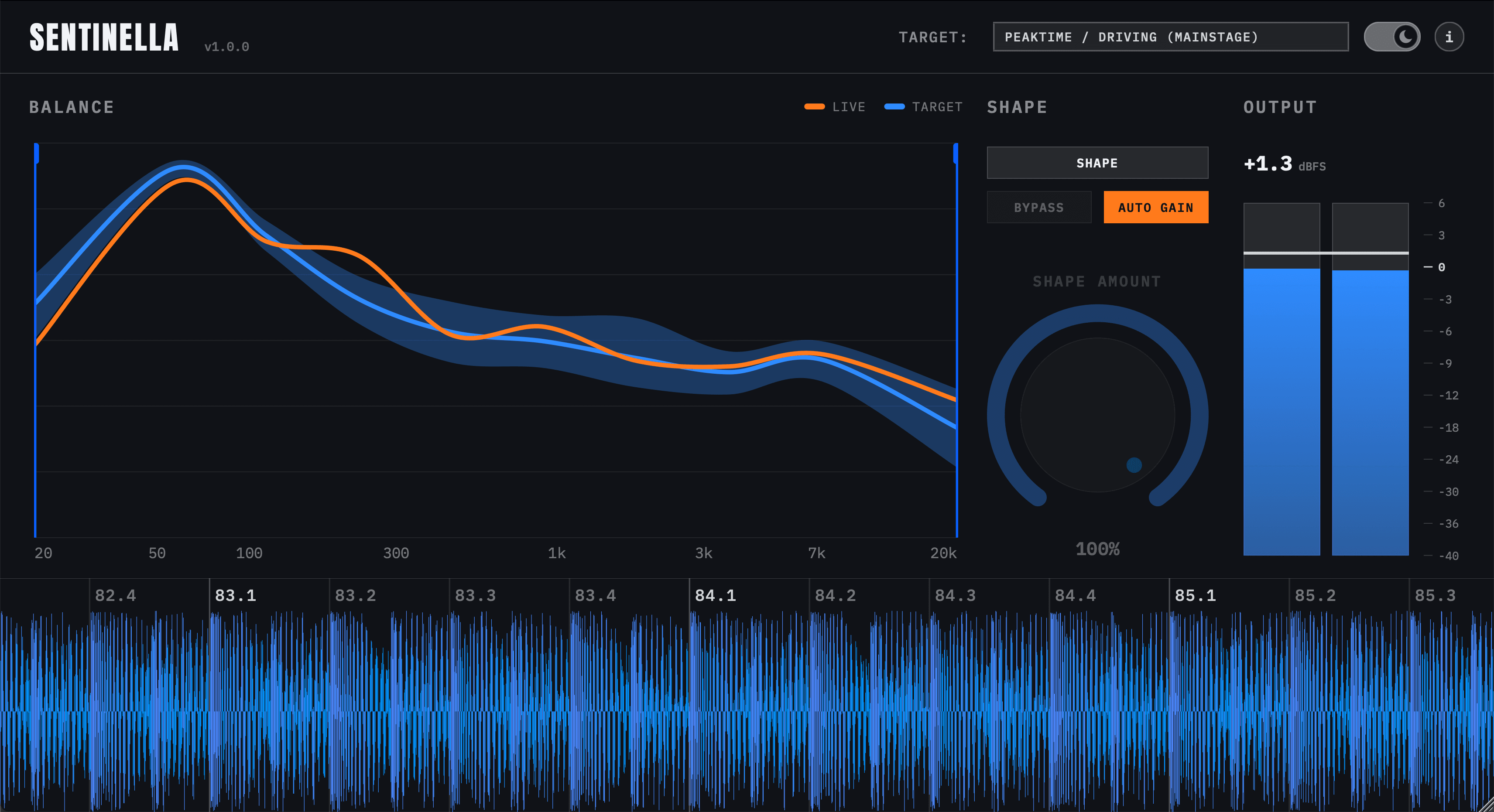
Live curve plotted against Peak Time / Driving — Mainstage or Groove — Raw, Melodic, or a Custom target built from your own tracks.
One click nudges your mix toward the target curve — dial in Shape Amount to control how hard it pulls, from a light nudge to a full match.
Drag the handles in from either edge of the chart to limit Shape to part of the spectrum — fix the low end and leave everything above it untouched.
Automatically compensates for perceived loudness changes, helping you compare the shaped and unshaped signal more objectively.
Two channel meters read true dBFS output level, live, so you always know what's leaving the plugin.
A scrolling strip locked to your host's playhead, so you always know where you are in the arrangement.
Live curve plotted against Peak Time / Driving — Mainstage or Groove — Raw, Melodic, or a Custom target built from your own tracks.
One click nudges your mix toward the target curve — dial in Shape Amount to control how hard it pulls, from a light nudge to a full match.
Drag the handles in from either edge of the chart to limit Shape to part of the spectrum — fix the low end and leave everything above it untouched.
Automatically compensates for perceived loudness changes, helping you compare the shaped and unshaped signal more objectively.
Two channel meters read true dBFS output level, live, so you always know what's leaving the plugin.
A scrolling strip locked to your host's playhead, so you always know where you are in the arrangement.
The same track before and after a pass against SENTINELLA.
What our customers say about our reference plugin.
10 reviews of SENTINELLA
Charles D
Drumcode, Truesoul, Arcane
“Loving this new reference plugin. Much better than Ozone's Tonal Balance Control.”
Teenage Mutants
Drumcode, Filth On Acid, Terminal M
“The Shape feature is simply great. You select what style of music you're going for and it nudges things into place in seconds, instead of squinting at a spectrum analyzer for twenty minutes. Gets you 80% of the way there almost instantly.”

Wehbba
Drumcode, VOLTA, HIFN
“Love the plugin, very useful, very straight forward, and I like interface and how the functionality was implemented.”
“For fifteen years I’ve checked every techno mix the same way: A/B it against records that work on a big system, look at a spectrum analyzer, and guess how far off the low end is. It’s slow, and it tells you what’s different, not what to change.
Sentinella does that check inside the DAW. It shows your mix’s tonal balance against a target built from peak time, raw or melodic techno — or from your own reference tracks — and Shape moves the mix toward it in one click.”

Buy below — installers for Windows and macOS are ready to download immediately after checkout.
A single perpetual license, yours to use on your own machines. No subscription, no iLok, no account. The license is a signed key that the plugin checks locally — it never contacts a server.
Sentinel DSP builds and sells it. The reference targets and the workflow behind them come from the studio of Mattia Saviolo, who co-designed the plugin.
VST3 on Windows and macOS, AU on macOS.
Any DAW that hosts VST3 or AU plugins. It's tested and verified in Ableton Live, Logic Pro, Bitwig Studio, Cubase, Studio One, Reaper and FL Studio. Pro Tools isn't supported — there's no AAX version.
Yes. The macOS build is a Universal binary, so it runs natively on Apple Silicon (M1 and later) and on Intel Macs — no Rosetta needed.
Not at the moment — there's no trial version of Sentinella. The video and the interactive screenshot above show the full plugin in use.
A spectrum analyzer shows you your mix. Sentinella shows you your mix against where a finished techno record sits, and can move it there. Instead of reading a curve and guessing which EQ moves to make, you pick a target, see the gap, and let Shape close as much of it as you want.
Yes — alongside the built-in targets, select Custom and load one track or a whole set of them at once. Sentinella analyses them together and builds a single Custom tonal balance target from the lot.
Yes — drag the frequency curtain in from either edge of the balance chart and Shape only corrects the range between the handles. Everything outside it passes through untouched.
Because the license key and the installer are delivered the moment you pay, the statutory right of withdrawal for digital content ends at that point — but write to us and we will sort it out with you.